stratO
PC (Windows) · Submitted by subderivative
Sign in to view and vote on hacks.
Reviews
No reviews yet.
Sign in to access SOL files.
External links
Related topics
No related topics yet.
Badges
No badges are recorded for this game.
About stratO
About This Game
stratO offers the thrilling satisfaction of flying through vast, procedurally-generated chasms as you perform chains of aerial maneuvers and slide across massive obstacles to charge your boosters and blast yourself ahead at supersonic speeds!stratO demands forethought and finesse, coordination and calculation -- and a lot of patience. Once upon a time, "hardcore game" used to mean something. I came from that time, and I brought stratO with me.
stratO has a deceptively high difficulty curve and if you are looking for a casual game, this is not for you. On the other hand, if you want the most explicit and exquisite control over the glider to be able to pull off aerial stunts that you see in movie trailers, and you're willing to dedicate yourself to mastering the controls, then stratO will not disappoint.
Key Features
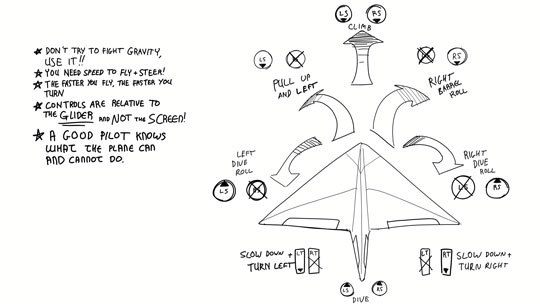
- Rather than telling your plane to go up/down/left/right, you control INDIVIDUAL air deflectors, and the sum of their generated torque is the result.
- This means that although the controls are harder to learn, a master pilot can pull off very tight aerobatic stunts and emergency recovery manoeuvres.
- Procedurally-generated world that gets more difficult as you collect more rings.
- Interwoven and deep game mechanics -- slide to boost, boost through rings or slide during a boost to refuel, tuck to magnetize wings and slide easier and double engine thrust and decrease drag, and that's just the start!
- Tight controls are simple to learn, but challenging to master. Being good at stratO is something to be _proud_ of.
- PC Version supports keyboard controls, XBOX Controllers (with vibration) and generic gamepads/flight sticks
- All controls are remappable (including menu & interface navigation)
Other Features
- Flightstick users can press+hold on the main control menu button(The one with the star on it for 3 sec) to toggle the game to pitch/yaw/roll controls
- Alternate colour scheme for airplane & orientation indicators for players with Deuteranopia