KongHack 101
If you'd rather have The Ignorant Masses explain it all to you, check out this Intro to Kong Hack video! It's pretty long but it covers everything on the site, in detail.
A few things about the site...
-
Points
- Points can be obtained in various different ways. Click on your user name and then "Points Store" to see how.
- 2 points will be deducted every day unless you have L33TH4X status (see below) or you donate, then you'll be exempt.
- Once your account hits -100 points, it will be "point dropped" and deactivated. A redemption email will be sent out so you can get your account back. With that being said, if you've signed up with a temporary email, change it to a legitimate one or you'll never get this email. Contribute to the site and you won't ever have to worry about this.
- You can spend your points on stuff in the Points Store.
- Read more here: https://konghack.com/topic/7917-new_account_policy
- And even more here: https://konghack.com/post/89837
- Lottery
- Lottery tickets can be purchased in the Points Store.
- Drawing is every Thursday.
- Tickets are 25 points each.
- Stocks
- We now have stocks! You can read more about it here: https://konghack.com/topic/8624-kong_hack_stocks
- You can use the points you acquire around the site to purchase them.
- Excellent opportunity to get a lot of points. (Avoid being point dropped for awhile.)
- Go invest in some stocks here: https://konghack.com/ucp/points/stocks
- Voting on hacks
- Hacks are sorted by votes. If they work, vote them up. If they don't, double check that they don't before down voting them. We did this as a convenience for you guys so you don't have to dig for working hacks.
- You must have at post count of at least 5 before you can vote. This was implemented because of abuse. With that being said, don't necro 2 year old threads, and post something useful. If you've got something off topic you'd like to discuss, use the Talk forum.
- CHECK THE ICON NEXT TO THE GAME! Be sure the AoB you're trying to use is for the version of the game you're playing. i.e. Kongregate, Newgrounds, Armor Games, etc. Click that link for a visual description.
- Installing the userscript makes this easy!
- Do NOT falsely downvote hacks. Repeat offenders may be banned
- More details here, including illustrations!
- Also, if you submit an AoB hack or a trainer, every time it is upvoted you'll get points. 10 for AoB, 15 for trainer.
- KongHack Userscript
- If you don't have it installed, go do it now. You'll need Greasemonkey for Firefox or Tampermonkey if you're using Chrome.
- Install link: https://konghack.com/user_script/129708.user.js
- This userscript will add an iframe below your game and display all of the current hacks we have for that game.
- Works on the following sites: Kongregate, Newgrounds, Armor Games, Nitrome, Mochi Games, and Mini Clip.
- Can be confirgured in the User Control Panel (see below).
- You must be logged into this site for it to work properly.
- KongHack Ultra Trainer
- This thing is bad ass! Especially if your tired of that redundant AoB copypasta nonsence...
- Using it is simple...
- Open the game you'd like to play/hack in your browser.
- Log in to the program with your Kong Hack username and password (NOT your Kongregate info)
- Click "Scan Browsers" and double click your game and all of the AoB hacks we have in our database will auto populate.
- Just click the ones you want to use and click "Apply Hacks".
- ???
- Profit!
- The program will auto vote for you as well so just be aware when your applying those hacks that the correct process is selected and you have the right hacks for the game.
- Auto login and auto vote can be turned off by hovering over the axe in the top left.
- If you don't already have this program, go download it now! If you happen to find any bugs, please be sure to report them along with your system details.
- Donations (click here before reading then read really slow)
- Every day, helpless developers are abused, beaten, and neglected...to meet impossible deadlines, fulfill feature requests, fix bugs...any they're crying out for help.
- Please, go to the homepage and enter in your donation, right now.
- For as little as $1.00, you'll help rescue developers from their abusers and help provide hosting, faster bandwidth, and maintenance.
- Donate right now and you'll recieve 500 points for every dollar donated, a sponser banner next to your name, an exemption from the daily point deduction, and the thanks of the developers, developers who can continue to provide everyone free access to this awesome site, thanks to you.
- Right now there's a developer who needs you, and your donation says, "I'm here to help".
- Please donate. Right now.
- Seriously though, donations are welcomed, but completely voluntary.
- Check the homepage, right hand side, scroll down and you'll see the donation block.
Bug TrackerAt the bottom of every page there is a link to our Bug Tracker.Use it for reporting bugs, submitting ideas, etc.
- Do NOT
- Upload malware of any type. YOU WILL BE BANNED
- Link to malware of any type. YOU WILL BE BANNED
- Link to malicious sites. YOU WILL BE BANNED
- Link to surveys. YOU WILL BE BANNED
- Falsely downvote hacks. YOU WILL BE BANNED
- Submit false hacks. YOU WILL BE BANNED
- Post AoBs to other sites without permission and credit given to the author and where it came from. You'll probably be bannd.
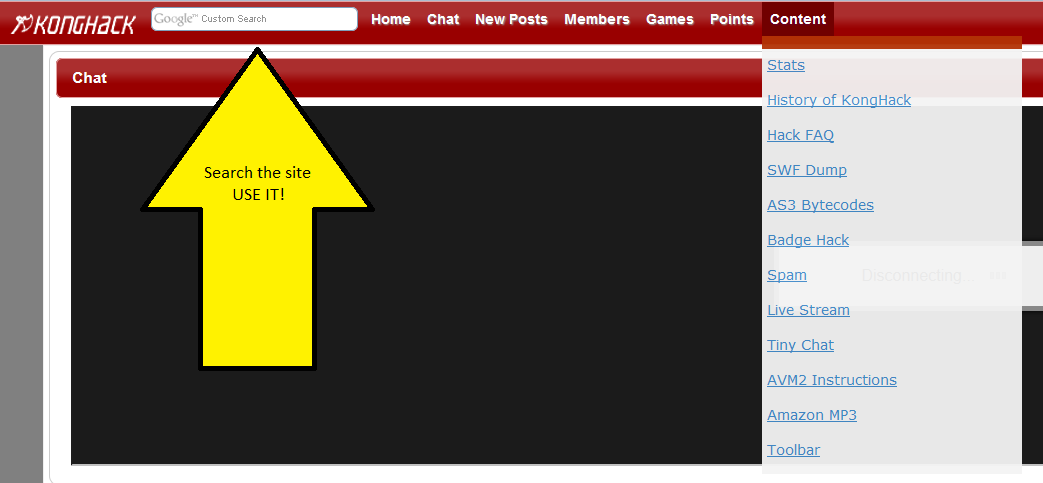
- Do not be afraid to post in the forums or chat. Make sure you search the site for the answer first. It has likely already been answered.
- WE WILL NOT HACK KREDS! Do NOT ask! Consider this your one and only warning. YOU WILL BE BANNED
- (Recommended) Do not use free proxies/VPNs. Wanna know why? Read this.
- Do
- Use the search function of this site!
- Read all of the tutorials you can find.
- Try to follow the tutorials. You'll learn more by doing.
- Ask for help after searching for the answer yourself. There's usually someone in the chat that can help.
- Contribute!
Search bar
This is the search bar. Use it to search the site. Preferably before posting a question that has already been answered. You can also get help from people in the chat.
Note to Firefox users: v22 introduced some new features which block mixed content. If your search results come back blank, look for a shield to the left of your address bar, click it, change "Keep blocking" to "Disable Protection on This Page"
Note: The style has changed a bit since this was made but the information is still relevant.
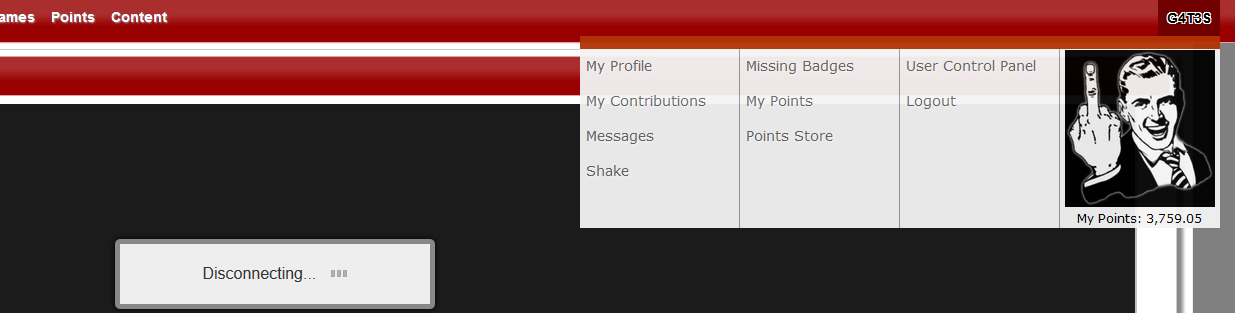
Navigation
My Profile - View your profile.
My Contributions - View your posts, submitted hacks, sols, reviews, hacks you've voted on, and your points log.
Messages - View your private messages.
Shake - Only seems to work in Chrome and Firefox v24, try it!
Missing Badges - Displays the Kongregate badges that you don't have.
My Points - View your points log or transfer points to another user.
Points Store - Spend those points you've accumulated! Custom color, title, lotto tickets, and more.
User Control Panel - See below.
Logout - Figure it out.
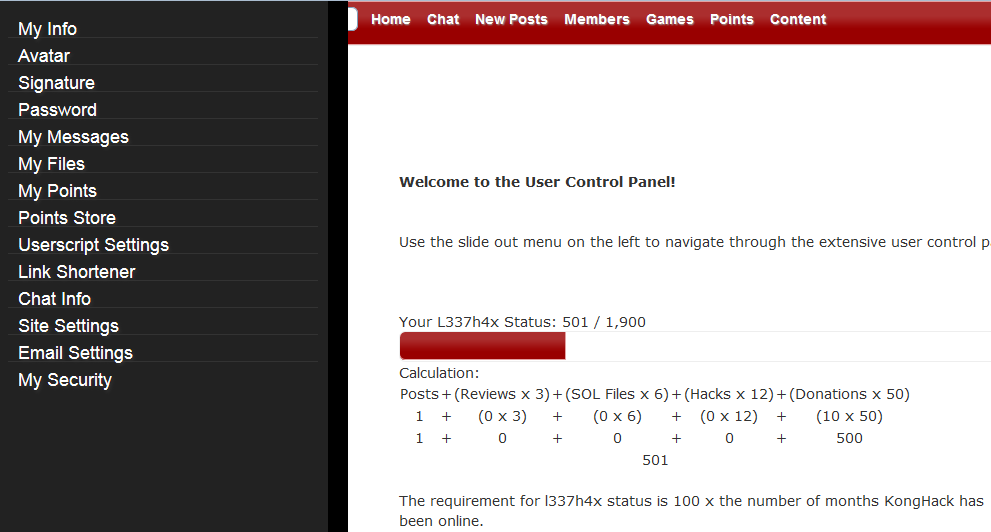
User Control Panel
My Info - Edit your personal information here.
Avatar - Upload your avatar here. We use Gravitar on the site. So go sign up or upload your own unless you want a randomly selected avatar.
Signature - Edit your profile signature. Heed the warning.
Password - Change your password
My Messages - View your private messages.
My Files - This is where you can upload various different types of files. There are restrictions on certain filetypes.
My Points - Points log.
Points Store - Spend those points you've accumulated! Custom color, title, lotto tickets, and more.
Userscript Settings - Configure the KongHack userscript. (Download it from the homepage)
Link Shortener - Our very own link shortener. It looks like this: http://gcw.cz/gates
Chat Info - All of the information needed to connect to our chat through a client (Psi, Pidgin, Xabber, etc.)
Site Settings - Currently the only option is to toggle the homepage chat on or off.
Email Settings - Select which type of emails you would like to receive from us.
My Security - Enable 2nd tier authentication as well as IPs you've logged in from.
L33TH4X status - The formula is in the above image. Once you've obtained L33TH4X status, you will be exempt from the daily point deductions and you get an awesome banner next to your name.
Forums
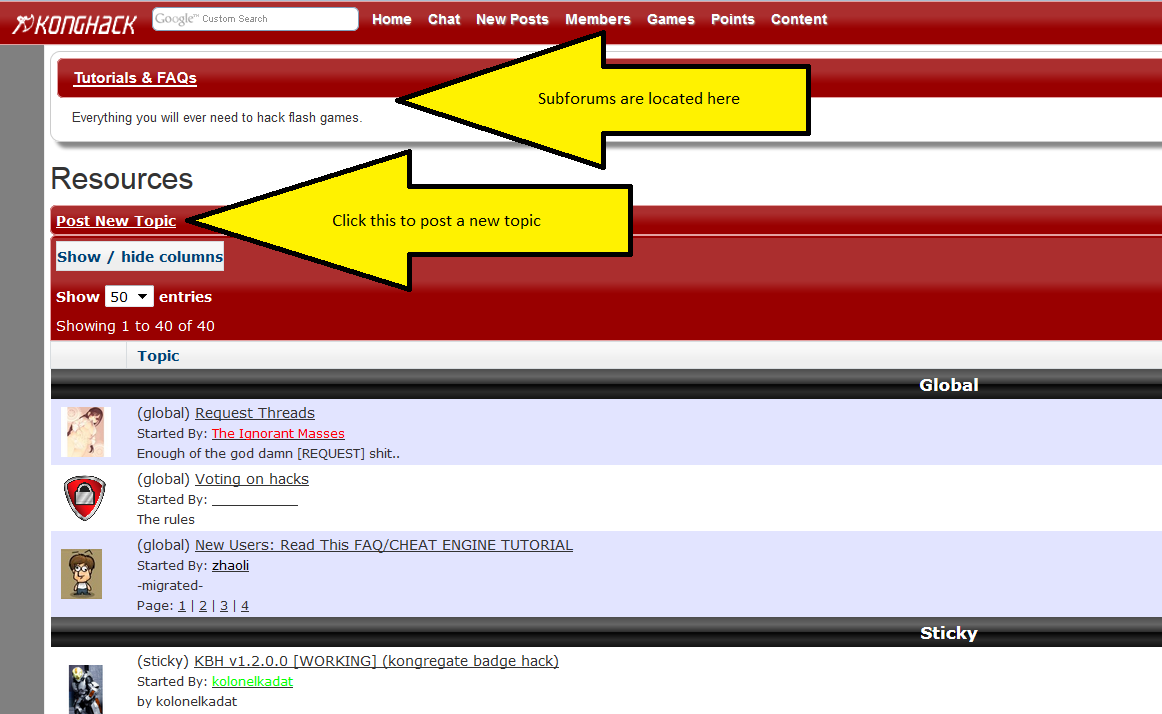
Global - Global stickys will show up in every forum and every subforum. We recommend you read through them.
Sticky - Stickies specific to the current forum.
Normal - Below this is all of the posts.
Search - Note the search bar on the right. It's different than the search bar at the top left of the page. This is for searching through the current forum's post titles/descriptions. You have to manually clear this yourself. It will will hold your search term even if you go to another page. So if you notice the forums look a little empty, check there first.
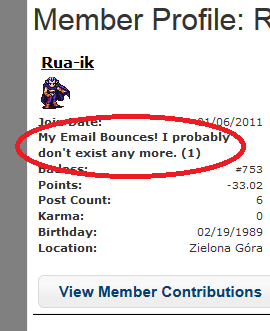
Email bounce
If you see this, it means that you've used a fake email address or your mail server is rejecting our emails. Change your email address to a valid one. gmail, yahoo, or another major email provider should work. Just a warning, I believe the system is set to delete your account after a certain number of bounces! So if you see this number going up and you're sure you have a valid email, click the "Send Feedback" button in the bottom right of the page and let us know or hop in chat and let a mod know there.
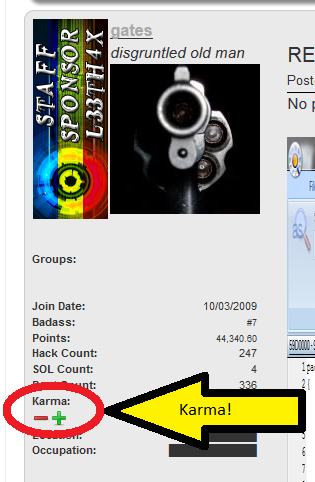
Karma (use it!)
Karma is a type of rating system. It's given to users by other users. If you find someones post helpful, amusing, insightful, etc., click that little plus sign and let them know. If someone is being an asshat, click the minus sign and tell them why. If you click on the Members link in the nav bar you can sort by karma. You'll find the users with the most karma are typically the biggest contributors to the site, whether it be hacks, help, or whatever. Sort it in ascending order and you'll see all of the fucksticks that probably ended up here (you don't want on that list).
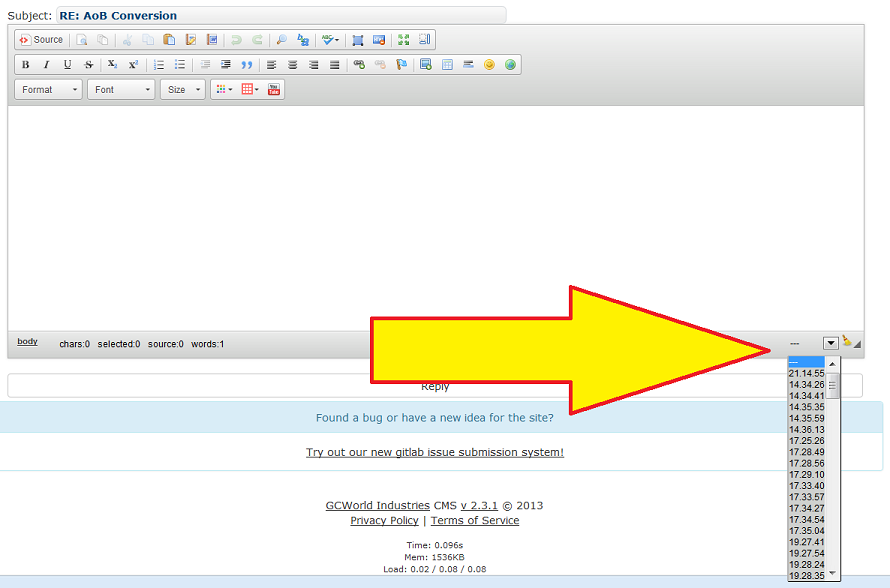
Post reply auto-save
Have you ever been in the middle of typing a long rant, detailed reply, or tutorial and have the browser crash or accidentally clicked on something that takes you away from the page and you lose everything you just typed? No worries just click that little arrow in the bottom right and select the last entry and you should get everything back. You can also click the broom and it'll clear everything out.
Apparently this feature has issues...
The Ignorant Masses says, "It's not reliable and shouldn't be depended on. In fact, in the latest version of CK, it doesn't function at all."
Now that you have the basics down, go check out this FAQ and browse through our Tutorials & FAQs section to learn how to apply the hacks and how to hack yourself!
Updated: 2/11/2014
I am gates